
RiskDesk · for prop-firm and funded-account traders
Size every trade to your prop-firm rules.
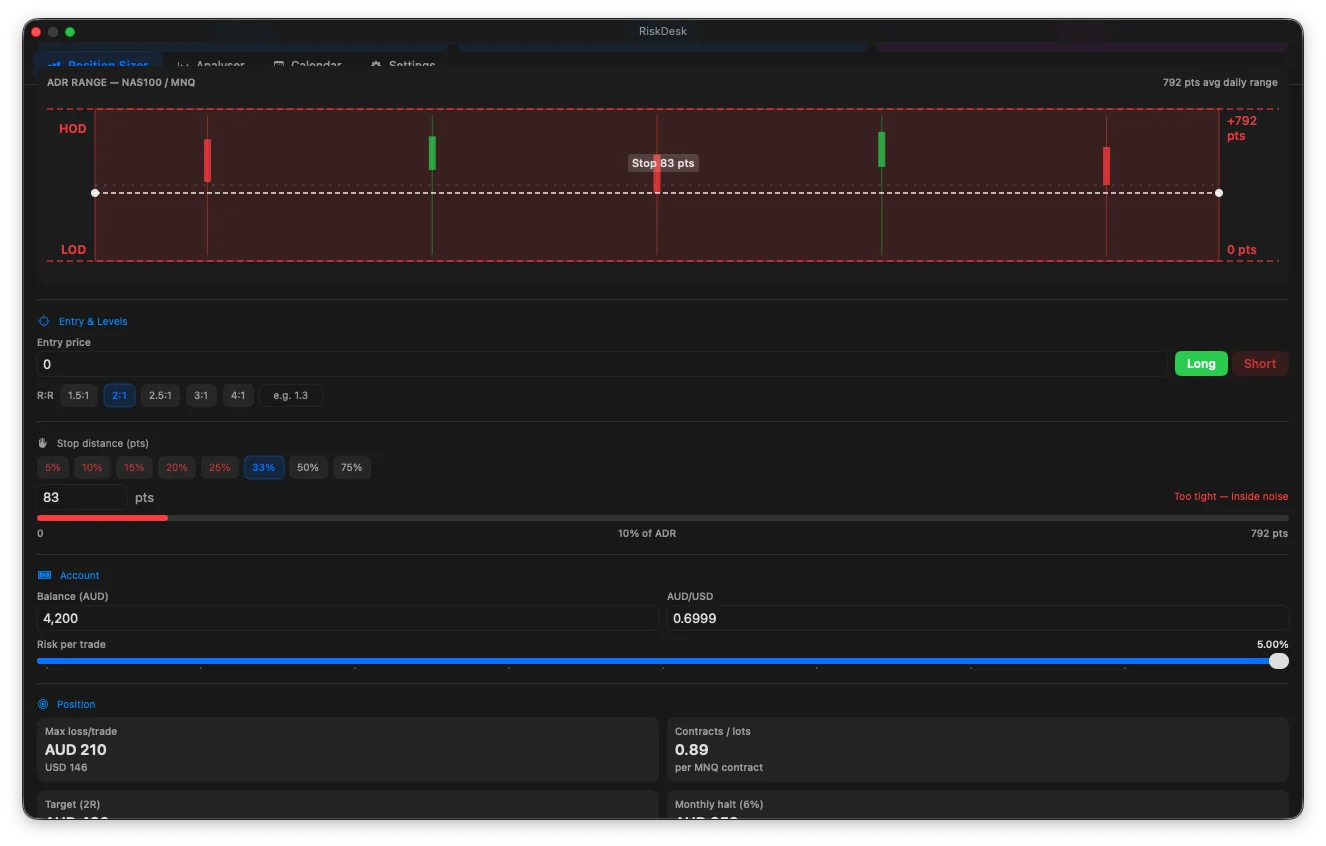
Enter your stop and your firm’s daily-loss and drawdown limits. RiskDesk gives you the size in contracts, lots or shares, warns you before a trade breaks your rules, and journals the result.
Free to download. Pro from US$5.99/month or US$59.99/year. Prices vary by store and region.



Not ready to install? Try the free prop-firm position size calculator →
The problem
Evaluation rules differ more than the headline numbers suggest.
Trailing or end-of-day drawdown, daily loss limits, consistency rules, minimum trading days. The same strategy at the same size can fit one plan’s rules and break another’s. RiskDesk does the arithmetic before you click.
Before the trade
Compare, size, and see the bad case first.
-
Compare 47 evaluation plans
RiskDesk compares 47 plans by the rules they actually run (drawdown type, daily limits, consistency rules, minimum days) and ranks them by a modelled estimate of payout per dollar of fee. It’s an estimate from the rules and fees, not a prediction of what you’ll be paid. Rules checked September 2026; firms change rules often, so always check your firm’s current terms.
-
Size to the plan’s limits
Pick a plan and RiskDesk sizes positions from your stop and the room left under its daily-loss and drawdown limits: contracts for futures, lots for forex or shares for stocks.
-
See the bad case before it happens
The Profitability Calculator (Pro) runs Monte Carlo simulations on your win rate and reward-to-risk to estimate a bad-case (95th-percentile) drawdown and an estimated probability of passing at a given risk per trade. Simulations use your inputs and aren’t forecasts. The maths is in our risk of ruin guide.
During and after
Then it keeps the record.
- Connected accounts show day P&L and distance to the drawdown limit.
- Your rules, checked first. RiskDesk warns you before a trade would break a rule. On a connected account it blocks new orders and alerts you once a limit is reached. It never closes a position for you.
- Smart Shield (Pro) moves an armed breakeven or trailing stop while the app is closed.
- Trade copier can mirror a leader account to follower accounts. Some firms restrict copiers, so check yours.
- Journal and Edge Optimiser group your own trades by setup, session, weekday and hold time. Groups with fewer than five trades are greyed out.
- Certificate. Share a summary of your logged track record.
Connections and platforms
Works with the platforms prop firms use.
Futures prop accounts connect through RiskDesk Bridge, a NinjaTrader 8 add-on that links Tradovate and Rithmic logins. Optional: cTrader, MetaTrader 5 (free Expert Advisor) and TradingView webhooks.
Mac
A floating panel above your charts. Requires macOS 26.5 or later.
iPhone & iPad
Requires iOS or iPadOS 17 or later. A separate App Store purchase from the Mac app.
Android
Available on Google Play.
Data doesn’t sync automatically between devices yet. Move it with a JSON backup.
Free vs Pro
Start free. Add Pro when you need it.
| Feature | Free | Pro |
|---|---|---|
| Position size for forex and futures, with ADR stops | Yes | Yes |
| Stock and ETF sizing | — | Yes |
| Profitability Calculator: plan comparison and Monte Carlo | — | Yes |
| Journal, calendar and Performance Analyser | — | Yes |
| Edge Optimiser and Risk Lab | — | Yes |
| Broker connections, prop tracker and trade copier | — | Yes |
| Smart Shield (stop management while the app is closed) | — | Yes |
| Price | Free | From US$5.99/month or US$59.99/year |
Prices vary by store and region. Cancel any time from your Apple or Google account.
What it isn’t
A tool, not a signal service.
RiskDesk is a calculator, journal and analytics tool. It doesn’t give signals, recommend trades, recommend a firm or predict results. Probabilities are model estimates from your inputs.
Free tools and guides
Do the maths in your browser first.
Frequently asked questions
Can I use RiskDesk for prop-firm evaluations?
Yes. RiskDesk sizes each trade from your stop and the room left under a plan's daily-loss and drawdown limits, and compares 47 evaluation plans (rules checked September 2026) by the rules they actually run. Firms change their rules often, so always check your own firm's current terms.
Does RiskDesk place trades?
Only if you connect a broker and choose to. Without a connection it is a calculator and journal. With RiskDesk Pro you can connect cTrader, MetaTrader 5 or TradingView webhooks, and futures prop accounts connect through RiskDesk Bridge, a NinjaTrader 8 add-on.
What happens when I hit a daily-loss or drawdown limit?
RiskDesk warns you before a trade would break one of your rules. On a connected account it blocks new orders and alerts you once a limit is reached. It never closes an open position for you.
Does it sync between my devices?
Not automatically yet. Export a JSON backup on one device and restore it on the other. The Mac and iPhone/iPad apps are separate App Store purchases.
Is RiskDesk financial advice?
No. RiskDesk is a calculator, journal and analytics tool. It does not give signals, recommend trades or predict results, and probabilities it shows are model estimates from your own inputs.
Prop-firm rule changes, explained.
Evaluation-rule changes we’ve spotted, a risk-maths idea and a RiskDesk tip. No signals, no trade calls. Unsubscribe any time.
Emails from ProDesk Pty Ltd. We won’t share your address. Privacy policy
Size to your rules on every trade.
Free to download. Pro from US$5.99/month or US$59.99/year.
RiskDesk is a reference and analytical tool, not financial advice. Simulations and probabilities are estimates based on your inputs, not predictions. Past performance is not indicative of future results. Trading leveraged products carries a high risk of loss. Check your own firm’s current rules.