
By ProDesk Apps · Mac · iPhone & iPad · Android
RiskDesk: position sizing, ADR stops and a trading journal in one app
RiskDesk is a position sizing and trade-risk app for Mac, iPhone, iPad and Android, made by ProDesk Apps. You enter your account size, risk per trade and stop, and it works out the position size in shares, lots or contracts. It can also place the stop from the instrument’s Average Daily Range (ADR). It includes a trading journal, performance analytics, personal trading rules and Monte Carlo risk tools. It’s free to download, with an optional Pro subscription.


Not ready to install? Try the free Position Size Calculator first →
Before, During, After
What RiskDesk does before, during and after a trade
Before you enter, it sizes the position and sets the stop. While the trade is open, it can manage that stop for you. Once it closes, the trade goes into a journal that shows you where your results actually come from.
-
Size every trade from your risk, not a guess
Choose how much of the account you’re willing to lose if the stop is hit, and RiskDesk converts that into shares for stocks and ETFs, lots for forex or contracts for futures. It converts between the instrument’s currency and your account’s base currency, and shows reward-to-risk targets from 1.5:1 to 4:1 so the exit is planned before the entry.
-
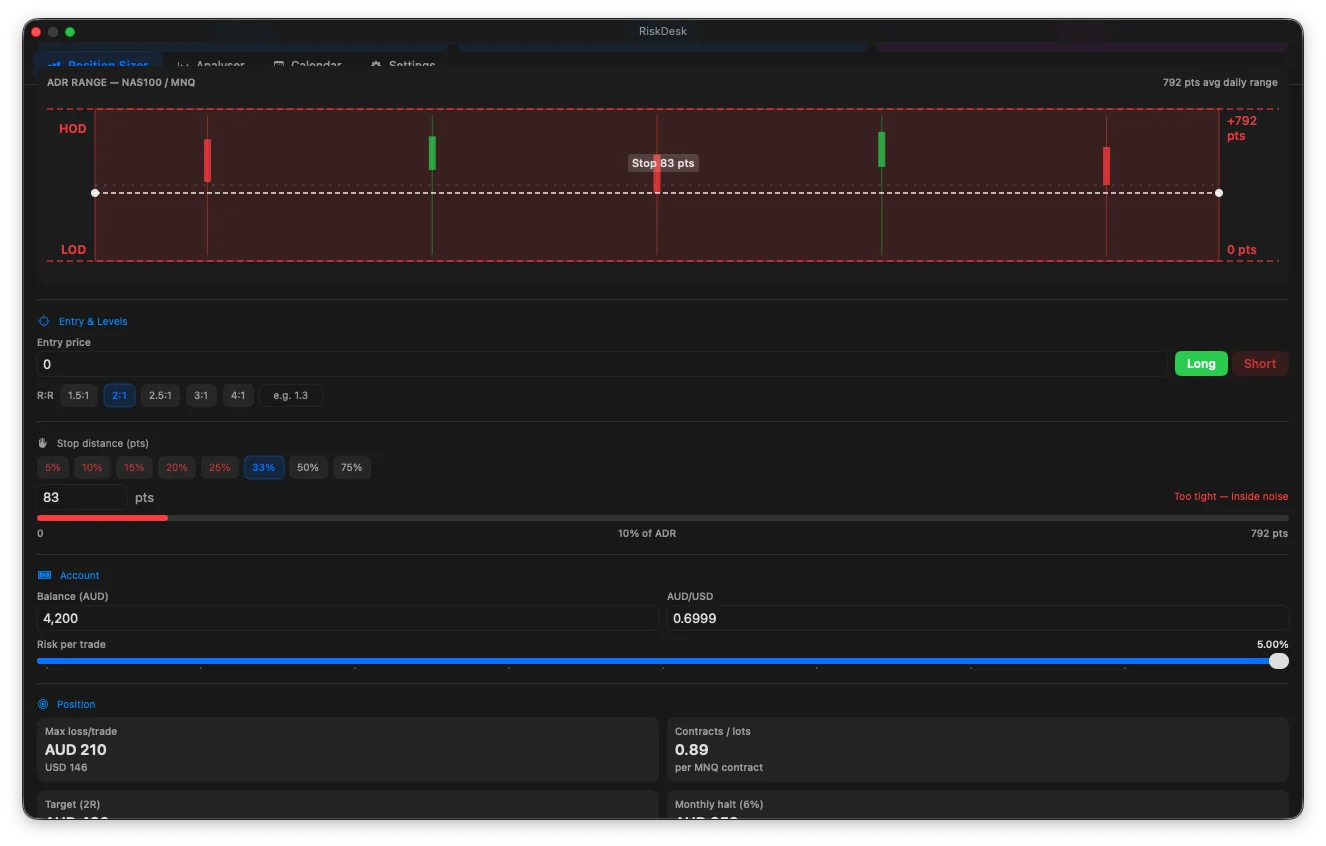
Stops from Average Daily Range
Instead of an arbitrary percentage, RiskDesk can anchor the stop to how far the instrument typically moves in a day. The stop then sits outside normal noise, and the position shrinks automatically on volatile days. ADR is an average, not a limit: price can and does move further around news. Our guide to where to place a stop loss covers the trade-offs.
-
Market regime at a glance
Each instrument is tagged Long bias, Short bias or Consolidating, using the slope of its 9- and 18-period moving averages. It’s a quick check that you’re not fighting the trend, not a signal to trade.
-
Smart Shield: stop management while the app is closed
Arm a breakeven or trailing stop on an open position and Smart Shield moves it for you when price reaches your trigger, with push and email alerts when it acts. This is the one part of RiskDesk that runs in the cloud, because it has to keep working after you close the app.
Journal & Analytics
Journal, analytics and your edge
-
Trading journal and calendar
A calendar shows daily P&L with weekly totals. Each day can carry notes and how you felt going in: Tired, Balanced or On Edge. Over a few weeks, that makes it obvious whether your worst days share a cause.
-
Performance Analyser
Import trades from your broker’s CSV export or log them by hand. You get an equity curve, win rate, profit factor, expectancy, Sharpe and Sortino ratios, maximum drawdown, longest losing streak, and a long-versus-short split.
-
Edge Optimiser
Groups your own closed trades by market state, setup, hold time, weekday and hour, so you can see which conditions you trade well and which cost you money. Any group with fewer than five trades is greyed out rather than presented as a result.
Risk Tools
Risk tools that answer “how much can I risk?”
-
Profitability Calculator
Give it your win rate, reward-to-risk and the drawdown you can tolerate. It runs Monte Carlo simulations to find the largest fixed risk per trade whose bad-case (95th-percentile) drawdown still fits, and for prop evaluations, the probability of passing. The maths behind it is explained in our risk of ruin guide.
-
Risk Lab
Stress-tests open exposure against doubled volatility, price gaps, correlation shocks and rate shocks, alongside value-at-risk and a drawdown monitor.
-
Trading rules you set yourself
Set a maximum daily loss, a maximum number of open positions, limits on correlated exposure and regime filters, on top of built-in best-practice rules. RiskDesk warns you before a trade breaks one.
Prop Firm Evaluations
Built for prop-firm evaluations
Evaluation rules differ more than their headline numbers suggest. RiskDesk ranks 47 evaluation plans (rules checked September 2026) by the rules they actually run, including drawdown type, daily limits, consistency rules and minimum trading days. The ranking uses expected payout per dollar of fee, with monthly fees re-billed for as long as an attempt typically runs. The Profitability Calculator then sizes positions for a chosen plan’s limits, and a certificate lets you verify your track record. Firms change their rules often, so always check your own firm’s current terms.
Platforms
Mac, iPhone, iPad and Android
Mac
A floating panel that stays above your charts, across Spaces and full-screen apps. Requires macOS 26.5 or later.
iPhone & iPad
Requires iOS or iPadOS 17 or later. The Mac and iPhone/iPad apps are separate App Store purchases.
Android
Available on Google Play.
Broker connection (optional)
Connect cTrader or MetaTrader 5 (through the free RiskDesk Expert Advisor) to place correctly sized orders with the stop attached, or send TradingView alerts through a webhook.
Data doesn’t sync automatically between devices yet. To move it, export a JSON backup and restore it on the other device.
Your Data
Your trading data stays on your device
Your journal, accounts and settings are stored on the device, and there’s no account to create. Backups are JSON files you save to iCloud Drive or Google Drive yourself. Three optional features use the cloud because they have to: Smart Shield (it moves stops while the app is closed), a live broker connection, and TradingView webhooks. Subscriptions are verified with Apple or Google. Read the RiskDesk privacy policy for the detail.
Pricing
Free to download, Pro when you need it
RiskDesk is free on all three stores, with limited features. RiskDesk Pro is a monthly or annual subscription. It unlocks stock and ETF sizing, the Profitability Calculator, Edge Optimiser, Risk Lab, Smart Shield and broker connections. It costs US$5.99 a month or US$59.99 a year; your store shows the price in your currency. Cancel any time from your Apple or Google account.
Free Calculators
How RiskDesk fits with the free calculators
The free Position Size Calculator does the sum once, in your browser. RiskDesk does it on every trade, with ADR stops, your own rules and a journal that remembers. To learn the method first, read position sizing explained, forex lot sizes, futures contract sizing and where to place a stop loss. If you also need to set money aside for tax on trading income, that’s what CashDesk is for.
Frequently asked questions
Is RiskDesk free?
Yes, RiskDesk is free to download on the Mac App Store, the App Store and Google Play, with limited features. RiskDesk Pro is a monthly or annual subscription that unlocks stock and ETF sizing, the Profitability Calculator, Edge Optimiser, Risk Lab, Smart Shield and broker connections. It costs US$5.99 a month or US$59.99 a year, and the store shows the price in your currency.
What markets does RiskDesk size positions for?
Forex in lots, futures in contracts, and stocks and ETFs in shares. RiskDesk converts between the instrument's currency and your account's base currency, so the size is right even when they differ. Stock and ETF sizing is part of RiskDesk Pro.
Where does the ADR figure come from, and can price move past it?
ADR (Average Daily Range) is calculated from the instrument's recent daily highs and lows. It is an average, not a limit: price regularly moves further than ADR, especially around news and economic releases, so treat an ADR-based stop as a sensible starting point rather than a guarantee.
Is my trading data sent anywhere?
Your journal, accounts and settings stay on your device, and there is no account to create. Backups are JSON files you control. The optional cloud features are Smart Shield, which moves stops you have armed while the app is closed, a live broker connection, and TradingView webhooks. Subscriptions are verified with Apple or Google.
Does RiskDesk connect to my broker or place trades?
Only if you choose to. RiskDesk works fully as a calculator and journal with no broker connection. With RiskDesk Pro you can optionally connect cTrader, or MetaTrader 5 through a free Expert Advisor, to place correctly sized orders with the stop attached, and route TradingView alerts through a webhook.
Does it sync between my Mac, iPhone and Android phone?
Not automatically yet. To move your data between devices, export a JSON backup on one device and restore it on the other. The Mac and iPhone/iPad apps are also separate App Store purchases.
Can I use RiskDesk for prop firm challenges?
Yes. The Profitability Calculator estimates your chance of passing an evaluation at a given risk per trade, and RiskDesk ranks 47 evaluation plans (rules checked September 2026) by their actual drawdown, daily-loss and consistency rules. Firms change their rules often, so always check your own firm's current terms.
Is RiskDesk financial advice?
No. RiskDesk is a reference and analytical tool. It does not tell you what to trade, and you are responsible for your own trading decisions.
Size with edge.
RiskDesk is a reference and analytical tool, not financial advice. ADR is a historical average, not a guarantee of how far price will move. Past performance is not indicative of future results. Trading leveraged products carries a high risk of loss. Support: riskdeskapp.com/support.